


Streamlining Server Management: What Is Core-Admin?

Managing one server can be straightforward. Managing several servers at the same time is a different challenge, especially when administrators need to monitor resources, review logs, respond to security events, and keep services running smoothly. This is where Core Admin dashboard features can make server administration more organized by bringing important management functions into a centralized environment.

What Is Core-Admin?
Core-Admin is a server administration and monitoring platform built around centralized management. Its main purpose is to give administrators a single place from which they can observe and manage multiple connected systems.
Think of it like a control room. Instead of walking to each machine to check its condition, an administrator can use one dashboard to see what is happening across the environment.
This approach can be particularly useful when an organization operates several servers for websites, applications, databases, email, or other services. A centralized dashboard can reduce the need to switch repeatedly between different management interfaces.
According to Onlive Server's overview of Core-Admin, the platform focuses on centralized administration, internal server monitoring, real-time log watching, process and service management, IP blocking, file-system monitoring, and event notifications.
Why Centralized Server Management Matters
Without centralized management, administrators may need to log in to individual servers whenever they want to check performance or investigate an issue. For a small setup, that may not be a major problem. As the number of machines increases, however, the process can become repetitive and make it harder to maintain a consistent overview.
A centralized management system can help by putting commonly needed information in one place. Some practical advantages include:
Faster visibility: Administrators can review server conditions without checking every machine separately.
Simpler administration: Common management tasks can be organized through a central interface.
Better event awareness: Logs and notifications can help administrators notice unusual activity.
Easier troubleshooting: Service, process, and system information can be reviewed when something goes wrong.
Improved organization: Multiple servers can be viewed as part of one environment rather than unrelated machines.
The goal is not to remove the administrator from the process. Instead, the dashboard reduces unnecessary switching and gives the administrator better information for making decisions.
Core Admin Dashboard Features That Matter
The value of Core-Admin comes from the collection of administrative and monitoring functions available through its centralized approach.
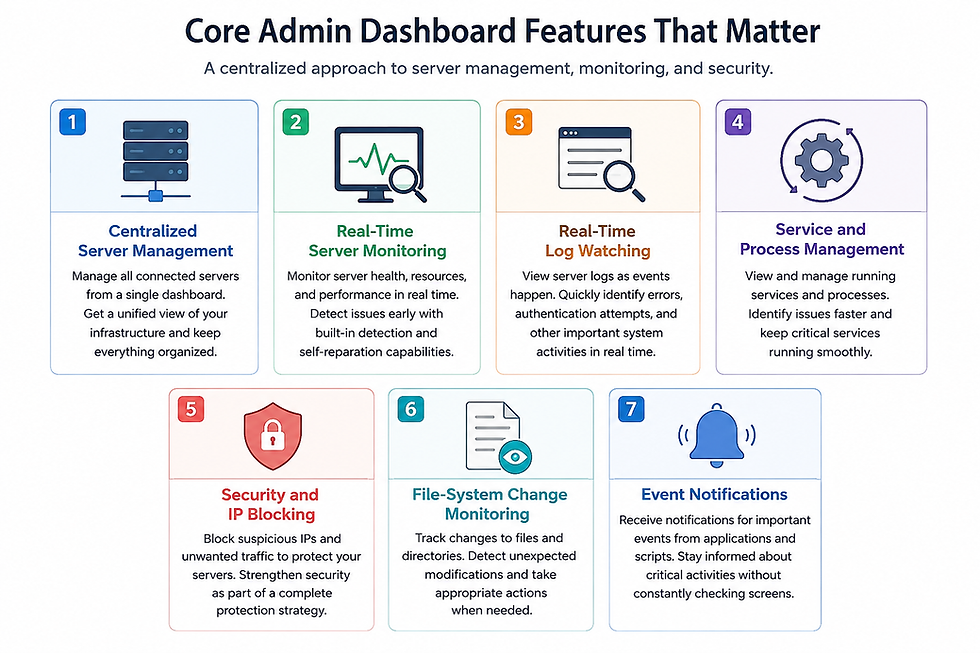
1. Centralized Server Management
One of the most useful Core Admin dashboard features is centralized management. Administrators can work with connected servers through a common management environment rather than treating each server as an isolated system.
This can be helpful for businesses operating different servers for separate applications or workloads. A centralized view makes it easier to understand which systems are active and where attention may be required.
2. Real-Time Server Monitoring
Server monitoring is important because problems are often easier to handle when they are detected early.
Core-Admin includes internal monitoring capabilities intended to observe server conditions and identify issues. Its monitoring approach also includes detection and self-reparation capabilities described by Onlive Server's Core-Admin documentation.
For an administrator, the practical benefit is visibility. Instead of waiting for a website or application user to report that something is wrong, monitoring information can provide an earlier indication that a service or system needs attention.
3. Real-Time Log Watching
Logs record what happens inside a server. They can contain useful information about services, applications, authentication attempts, errors, and other system activity.
Core-Admin provides real-time log watching, allowing administrators to observe server events as they occur.
This is especially useful during troubleshooting. If an application suddenly stops responding, reviewing current logs can help an administrator understand whether a service error or another system event occurred around the same time.
4. Service and Process Management
A server runs many background services and processes. Some handle web traffic, while others support databases, networking, security, or other applications.
Core-Admin includes a service and process viewer, giving administrators a way to inspect these running components from the management environment.
For beginners, think of services as workers inside the server. If one worker stops doing its job, the administrator needs a way to identify it and investigate the problem.
5. Security and IP Blocking
Security is another important part of server administration. Administrators may need to respond to suspicious connections or unwanted traffic.
Core-Admin includes an integrated IP blocking system as part of its administrative tools.
This does not mean that a dashboard should replace a complete security strategy. Firewalls, updates, access controls, backups, strong authentication, and application security still play important roles.
6. File-System Change Monitoring
Unexpected file changes can sometimes indicate a configuration problem, an application update, or potentially unwanted activity.
Core-Admin includes file-system change monitoring, which can help administrators identify changes taking place on a server.
For example, if an important configuration file changes unexpectedly, knowing that the change occurred can give an administrator a starting point for investigation.
7. Event Notifications
Monitoring only becomes useful when important events reach the people responsible for the server.
Core-Admin provides an event notification mechanism that can communicate events from applications and scripts to its web panel.
This can help administrators focus on events that deserve attention instead of continuously watching every server screen.
Core-Admin vs. Managing Servers Individually
A centralized system is not automatically better for every environment. The right approach depends on the number of servers, administrative requirements, and the complexity of the infrastructure.
Management Aspect | Centralized Dashboard | Individual Server Management |
Server visibility | Multiple systems can be viewed centrally | Each server is checked separately |
Daily administration | Common tasks can be organized in one interface | More switching between systems |
Monitoring | Central view of relevant information | Monitoring may be separated |
Troubleshooting | Easier to compare information across systems | Investigation happens server by server |
Best suited for | Multi-server environments | Small or simple deployments |
The comparison is less about choosing one system for everyone and more about matching the management method to the environment.
Practical Examples
Managing Multiple Web Servers
Imagine a company running three web servers. One hosts the main website, another handles an application, and a third supports internal services.
Without a centralized dashboard, an administrator may need to log into each machine separately to check services and review logs. With a centralized management approach, the administrator can start with a broader view and then investigate the server that needs attention.
This can make routine administration less fragmented, particularly when the infrastructure grows.
Investigating a Suspicious Change
Consider another situation. An administrator notices that a website is behaving differently after an unexpected configuration change.
File-system monitoring can provide useful information about changes that occurred on the server. The administrator can then review logs and running services to understand what happened instead of relying only on guesswork.
The dashboard does not automatically solve every security incident. Its value is that it can bring several pieces of operational information together during the investigation.
How Core-Admin Can Improve Administrative Efficiency
The biggest advantage of centralized administration is often not a single feature. It is the reduction of repetitive work. An administrator may repeatedly perform tasks such as:
Checking whether servers are responding.
Reviewing system activity.
Looking at running services.
Checking recent logs.
Investigating unusual events.
Reviewing system changes.
Responding to security-related activity.
When these activities are accessible from a common management environment, administrators can spend less time moving between separate systems.
For organizations that depend heavily on physical server infrastructure, choosing the right hardware and management approach also matters.
A managed dedicated server can be considered when an organization needs dedicated infrastructure while also wanting professional assistance with server administration.
Core Admin Control Panel and Security
Security should be considered from several angles rather than through one feature.
Core-Admin's documented capabilities include IP blocking, file-system monitoring, internal checking tools, event monitoring, and tools designed to identify potentially suspicious web activity.
However, administrators should still follow basic security practices:
Keep the operating system and applications updated.
Use strong and unique administrative credentials.
Restrict administrative access wherever practical.
Maintain reliable backups.
Review logs regularly.
Remove unnecessary services and accounts.
Use appropriate firewall and network controls.
If you want a more detailed overview of the platform's capabilities, the Core Admin control panel guide provides additional background on its monitoring, management, and security-related features.
When Is Core-Admin Useful?
Core-Admin can be particularly relevant when administrators need centralized visibility across several connected servers.
It may be useful for:
Businesses operating multiple dedicated servers.
Hosting environments with several machines.
Administrators responsible for different server roles.
Teams that need centralized monitoring.
Organizations that want easier access to logs and system information.
Environments where tracking server events is important.
For a single small server with very few administrative requirements, a full centralized management approach may provide less benefit. The value increases as the environment becomes more complex.
Common Mistakes to Avoid

1. Assuming the Dashboard Replaces Administration A management dashboard provides visibility and tools, but administrators still need to understand what their servers are running and why.
2. Ignoring Security Basics IP blocking and monitoring should not be treated as a complete security solution. Updates, access controls, backups, and network security remain essential.
3. Monitoring Without Acting Collecting logs and alerts is useful only when someone reviews important events and responds appropriately.
4. Giving Everyone Full Access Administrative dashboards can provide powerful controls. Access should therefore be limited according to each person's responsibilities.
5. Ignoring Server Compatibility Before deploying any management tool, administrators should check operating-system requirements, supported environments, integrations, and current documentation.
6. Treating Automation as a Substitute for Oversight Automated monitoring can reduce repetitive work, but important changes and security events still require human review.
Frequently Asked Questions
Q. What is Core-Admin used for?
A. Core-Admin is used for centralized server administration and monitoring. It brings functions such as monitoring, log viewing, service and process management, and security-related tools into a common management environment.
Q. Is Core-Admin suitable for multiple servers?
A. Yes, its centralized design is particularly relevant to environments where administrators need to work with multiple connected servers. The main benefit is having a broader view instead of managing every machine completely separately.
Q. What are the main Core Admin dashboard features?
Q. Important features include internal server monitoring, real-time log watching, service and process viewing, IP blocking, file-system change monitoring, system user management, task management, and event notifications.
Q. Does Core-Admin improve server security?
A. It can support security administration through functions such as IP blocking, monitoring, event detection, and file-system change tracking. However, it should be used as one part of a broader server security strategy.
Q. Can beginners use Core-Admin?
A. The centralized dashboard approach can make routine server information easier to access, but some basic understanding of servers is still helpful. Beginners should learn what services, processes, logs, users, and security events mean before making major changes.
Q. Is Core-Admin a replacement for server monitoring?
A. It can provide monitoring capabilities as part of its management environment. However, organizations should evaluate their specific monitoring, alerting, security, and availability requirements before deciding whether it covers every operational need.
Q. Why is centralized server management important?
A. Centralization can reduce repetitive logins and make it easier to see what is happening across several systems. This becomes increasingly useful when an organization manages multiple servers or different server roles.
Conclusion
The main value of Core Admin dashboard features is the ability to bring server administration and monitoring into a more organized environment. Real-time logs, server monitoring, process and service visibility, security tools, file-system monitoring, and event notifications can help administrators understand what is happening across their infrastructure.
Core-Admin is not a replacement for good server administration practices, but it can make routine management more structured and easier to oversee.
Ready to simplify your multi-server management? Explore Onlive Server's dedicated server plans to find the right infrastructure for your business, and pair it with centralized tools like Core-Admin to stay in control of your entire server environment from one powerful dashboard.

Comments