


cPanel vs Plesk: Which Hosting Control Panel Wins in 2026?

Updated: Aug 6
Choosing a hosting control panel can feel confusing when you're setting up your first website or managing an online business. The cPanel vs Plesk control panel debate has been around for years because both platforms simplify website management without requiring advanced technical knowledge.
The good news is that there isn't a single "best" option for everyone. Your choice depends on factors such as your operating system, budget, hosting environment, and personal preferences. This guide compares both control panels in plain English so you can confidently decide which one fits your needs in 2026.
What Is a Hosting Control Panel?
A hosting control panel is a graphical dashboard that helps you manage your website and server through a web browser. Instead of typing complex commands, you can perform everyday tasks using buttons and menus.
Typical tasks include:
Creating email accounts
Uploading website files
Managing databases
Installing applications like WordPress
Creating backups
Monitoring storage and bandwidth
Managing domains and SSL certificates
Think of a hosting control panel as the dashboard of a car. You don't need to understand how the engine works to drive safely you simply use the controls provided.
cPanel vs Plesk Control Panel: Quick Comparison
Feature | cPanel | Plesk |
User Interface | Traditional, feature-rich | Modern, organized, clean |
Operating System | Linux only | Linux and Windows |
Beginner Friendliness | Easy after some practice | Very beginner-friendly |
Multi-Domain Management | Strong | Strong |
WordPress Management | Excellent | Excellent |
Extensions | Wide selection | Wide selection through extensions |
Licensing | Paid | Paid |
Best For | Linux hosting users | Linux and Windows users |
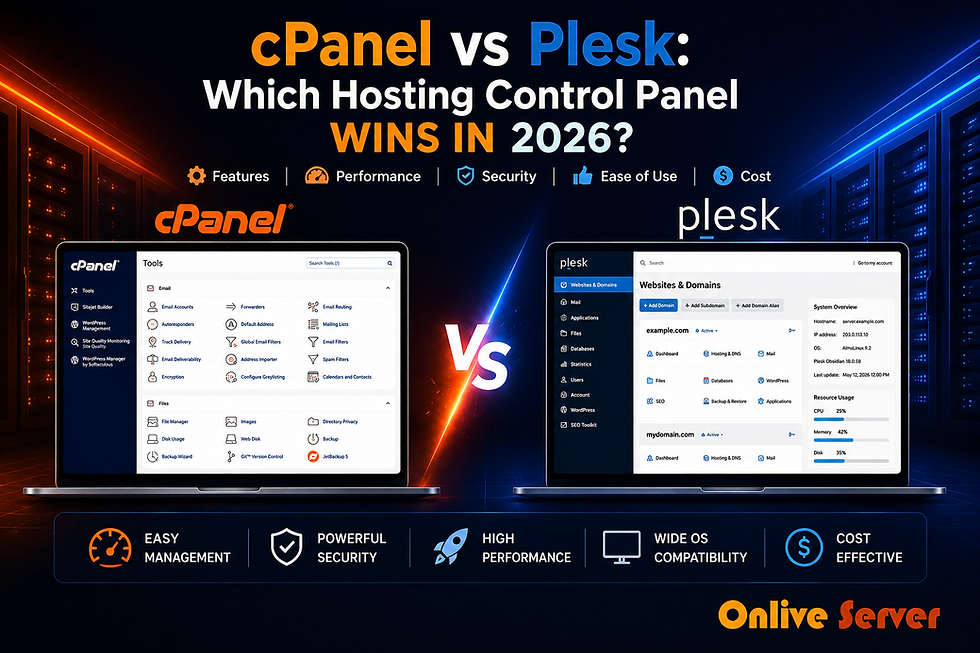
User Interface: Which One Is Easier?
cPanel
cPanel has been one of the most widely used hosting control panels for many years. Its interface groups many features into categories, allowing users to manage nearly every hosting task from one dashboard.
For experienced users, this layout is efficient because almost every tool is available immediately.
However, beginners may initially find the number of icons and settings slightly overwhelming.
Plesk
Plesk follows a cleaner and more organized design philosophy. Instead of displaying dozens of options at once, related tools are grouped together logically.
This makes it easier for someone new to web hosting to locate common features without spending time searching through multiple menus.
Winner for beginners: Plesk
Winner for experienced Linux users: cPanel
Operating System Compatibility
One of the biggest differences between these platforms is operating system support.
cPanel
cPanel is designed specifically for Linux servers.
If your hosting uses Linux which many shared hosting and VPS providers do—cPanel works very well.
Plesk
Plesk supports both:
Linux servers
Windows servers
This flexibility makes Plesk especially useful for businesses running Windows-based applications such as ASP.NET alongside traditional websites.
Real-World Example
Imagine a company developing an ASP.NET application.
Since ASP.NET runs on Windows servers, Plesk becomes the practical choice because it fully supports Windows hosting environments.
Meanwhile, a personal WordPress blog hosted on Linux can work perfectly with either control panel.
Licensing Costs
Neither cPanel nor Plesk is free.
Both require commercial licenses that hosting providers or server owners purchase.
The total cost depends on:
Number of accounts
Server type
License edition
Hosting provider pricing
For individual website owners using shared hosting, these licensing costs are usually included in the hosting package.
For VPS or dedicated server owners, licensing becomes a more important consideration when calculating overall operating expenses.
If you're comparing different VPS hosting panels, remember that the control panel license is only one part of the total hosting cost.
Security Features
Security matters because your hosting control panel controls access to your entire website.
Fortunately, both platforms include several important security tools.
cPanel Security Features
SSL certificate management
Password protection
IP blocking
Backup management
Two-factor authentication support
User account permissions
Plesk Security Features
Built-in security monitoring
SSL management
Firewall integration
Automatic updates
Security extensions
Two-factor authentication
Neither platform automatically guarantees perfect security.
Keeping software updated, using strong passwords, enabling backups, and following basic security practices remain the owner's responsibility.
Website and Server Management
Both control panels make everyday administration much easier.
Common management tasks include:
Creating subdomains
Managing DNS records
File uploads
Database creation
Cron jobs
Email account setup
Backup restoration
The difference is mostly in how these tools are presented rather than what they can accomplish.
Administrative Overhead
Administrative overhead refers to the amount of effort needed to manage your hosting environment over time.

cPanel
Administrators familiar with Linux often appreciate cPanel because many advanced settings are easy to access.
However, first-time users may spend more time learning where different options are located.
Plesk
Plesk emphasizes simplicity.
Many maintenance tasks can be completed with fewer clicks, making routine website management less intimidating for beginners.
Real-World Example
Suppose a freelance designer manages websites for ten local businesses.
Instead of remembering Linux commands, they simply log into Plesk to update websites, create email accounts, and restore backups. This saves time while reducing the chance of configuration mistakes.
Which Control Panel Is Better for WordPress?
Both cPanel and Plesk work well with WordPress.
They allow users to:
Install WordPress
Create databases
Manage files
Configure SSL
Create backups
Update website settings
Many hosting providers also include one-click WordPress installers regardless of which control panel they use.
If you'd like a deeper explanation of how these platforms work in practical hosting environments, this Plesk vs cPanel guide provides additional background and tutorials.
Common Mistakes to Avoid
Many beginners focus only on the control panel and overlook other important hosting factors.

Avoid these common mistakes:
Choosing a control panel before confirming which operating system your hosting uses.
Ignoring licensing costs when purchasing a VPS or dedicated server.
Assuming every hosting provider offers both cPanel and Plesk.
Forgetting to enable automatic backups.
Using weak administrator passwords.
Selecting a platform simply because someone else recommends it without considering your own needs.
Frequently Asked Questions
Q. Is cPanel better than Plesk?
A. Not necessarily. cPanel is an excellent choice for Linux hosting, while Plesk offers additional flexibility by supporting both Linux and Windows servers.
Q. Which control panel is easier for beginners?
A. Many first-time users find Plesk slightly easier because of its clean interface and organized navigation. However, cPanel also becomes easy to use after some experience.
Q. Can I migrate from cPanel to Plesk later?
A. Yes. Many hosting providers offer migration tools or assistance, although the exact process depends on your hosting environment and website configuration.
Q. Does the control panel affect website speed?
A. Not directly. Website performance depends more on server hardware, software configuration, caching, and optimization than on the control panel itself.
Q. Is cPanel only available for Linux?
A. Yes. cPanel is designed specifically for Linux servers and does not support Windows hosting.
Q. Does Plesk support Windows hosting?
A. Yes. One of Plesk's biggest advantages is its compatibility with both Windows and Linux operating systems.
Conclusion
The cPanel vs Plesk control panel comparison doesn't produce a universal winner because both platforms solve similar problems in slightly different ways.
If you primarily use Linux hosting and want a well-established ecosystem, cPanel remains a reliable choice. If you value a cleaner interface or need Windows compatibility, Plesk offers greater flexibility. Understanding your hosting requirements before making a decision will help you avoid unnecessary migration later.
If you're exploring hosting environments and want to understand how different VPS hosting panels fit into various server setups, the VPS hosting resources linked above provide a helpful next step for learning.


Comments