


How to Evaluate and Choose the Best WordPress Hosting Providers

Choosing a WordPress hosting provider is an important decision, especially if you are building your first website. A good Best WordPress hosting provider review should not focus only on price or a list of features. It should help you understand whether the hosting environment can keep your website fast, stable, secure, and easy to manage.
The good news is that you do not need to be a server expert to compare hosting providers. By checking a few practical areas such as speed, backups, PHP resources, caching, and customer support you can make a much more informed decision.

What Should You Look for in WordPress Hosting?
Think of hosting as the home where your website lives. Your WordPress files, images, database, themes, and plugins all depend on the hosting environment to work properly.
A suitable WordPress hosting provider should offer enough resources for your website today while allowing you to upgrade when your needs increase.
Before choosing a plan, check:
Server performance and response time
Storage type and available resources
Backup frequency and restoration options
PHP memory and other resource limits
Caching options
Security features
Customer support
Upgrade and migration options
You do not necessarily need the most expensive plan. You need a plan that matches the size and requirements of your website.
How to Evaluate Hosting Speed
Website speed is one of the first things worth checking when comparing hosting providers. Visitors generally expect pages to load smoothly, while a slow server can make an otherwise well-designed website feel unresponsive.
However, avoid judging a provider based on one advertised loading-time figure. Hosting is only one part of website performance. Your images, plugins, theme, database, code, and caching configuration can also affect loading times.
What Speed Factors Should You Check?
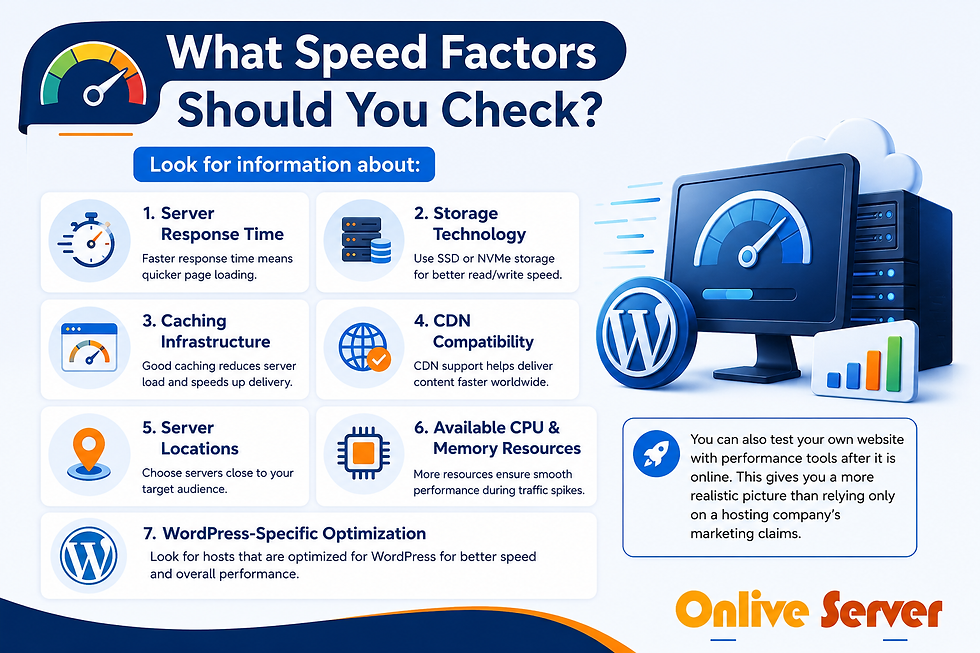
Look for information about:
Server response time
Storage technology
Caching infrastructure
CDN compatibility
Server locations
Available CPU and memory resources
WordPress-specific optimization
You can also test your own website with performance tools after it is online. This gives you a more realistic picture than relying only on a hosting company's marketing claims.
A Simple Example
Imagine a small business website with five pages and a gallery. The hosting server may be fast, but if every gallery image is several megabytes, visitors can still experience slow loading.
In this situation, changing hosting may help, but compressing images and removing unnecessary plugins could make an equally important difference.
This is why a useful Best WordPress hosting provider review should consider the complete hosting environment rather than one speed number.
Check the Backup System Before You Need It
Backups are easy to ignore when everything is working correctly. Their importance becomes obvious when a website breaks after a plugin update or an important file is accidentally deleted.
A hosting provider may advertise automatic backups, but you should look at the actual backup process.
Check:
How frequently backups are created
How long backups are retained
Whether the WordPress database is included
Whether you can restore a backup yourself
Whether backups are stored separately
Whether manual backups are available before major changes
For example, suppose you are changing your WordPress theme and something goes wrong. A recent backup can give you a way to return the website to its previous working state instead of rebuilding the site from scratch.
Understand PHP Memory Limits
WordPress relies on PHP to process many website operations. The PHP memory limit controls how much memory PHP scripts can use while processing those operations.
This becomes more relevant when your website uses a page builder, large plugins, complex themes, or other resource-intensive features.
When comparing hosting providers, look beyond storage space. Check the available PHP resources and whether the hosting environment allows those limits to be increased when necessary.
Important settings can include:
PHP version
PHP memory limit
Maximum upload size
Maximum execution time
Other account resource limits
A website with plenty of disk space can still experience errors if its PHP or server resources are too restrictive.
Why Caching Matters
Caching sounds technical, but the basic idea is simple.
Imagine a restaurant that prepares its most popular dish in advance rather than starting from zero every time someone orders it. Caching works in a similar way by keeping frequently requested website content ready to serve.
WordPress hosting environments may support several types of caching, such as:
Page caching
Object caching
Browser caching
Server-side caching
CDN caching
The exact setup varies between providers, so always check what is actually included.
Some WordPress hosting environments are configured specifically for WordPress performance. For example, OnliveServer's WordPress hosting page describes WordPress-focused server configurations, caching options, SSD storage, and LiteSpeed-based infrastructure.
If you want to understand what a WordPress-focused hosting environment can offer, you can also compare the features available with optimized WordPress servers.
Evaluate Customer Support
Good support can save a lot of time when something goes wrong.
A beginner may see an error message without knowing whether the problem comes from WordPress, a plugin, DNS, PHP, or the hosting server. A knowledgeable support team can help identify the source of the problem and suggest the next step.
Before choosing a provider, check:
Support availability
Contact methods
Expected response process
WordPress experience
Technical documentation
Migration assistance
Whether support is available outside normal business hours
For example, if your website suddenly stops working after a plugin update, being able to contact someone who understands WordPress hosting can be much more useful than having to diagnose the server problem yourself.
OnliveServer currently states that its WordPress hosting includes 24/7/365 support and WordPress-focused assistance.
Compare Hosting Providers Using Practical Criteria
Instead of comparing every feature listed on different hosting websites, start with the areas that directly affect your website.
Factor | What to Check | Why It Matters |
Speed | Server response, caching, storage | Affects page performance |
Backups | Frequency and restoration | Helps recover your website |
PHP resources | Memory and limits | Supports themes and plugins |
Caching | Page and server caching | Can reduce processing time |
Security | SSL, firewall, malware protection | Helps protect your website |
Support | Availability and expertise | Helps resolve technical problems |
Scalability | Upgrade options | Supports future growth |
This makes the comparison easier because you are looking at practical requirements rather than simply choosing the provider with the longest feature list.
Read WordPress Hosting Provider Reviews Carefully
Reviews can help you understand other customers' experiences, but do not treat one review as the final answer.
A person running a small blog may have completely different hosting requirements from someone operating an online store. One customer may have an excellent experience while another may encounter limitations because their website needs more resources.
When reading wordpress hosting provider reviews, look for repeated comments about:
Website performance
Support quality
Migration experience
Backup restoration
Resource limitations
Billing and renewal terms
Reliability
You can also use the existing wordpress hosting provider reviews resource as an additional reference when researching the factors that matter when choosing WordPress hosting.
Choose Hosting Based on Your Website's Needs
The right hosting plan depends on what you are building.
A personal blog with a few pages may have modest requirements. A business website with multiple forms, images, plugins, and regular visitors may need more resources. An online store can require additional capacity because product pages, shopping carts, customer accounts, and payment-related functions create more server activity.
Example: A Growing Online Store
Consider an online store that starts with 20 products. A basic hosting plan may work perfectly well at the beginning.
Later, the store grows to hundreds of products and receives significantly more visitors. If the hosting account has strict resource limits, the website may start experiencing slowdowns or resource-related errors.
A provider with clear upgrade options gives the website owner more flexibility as the business grows.
Don't Ignore Security
Hosting security is another important part of your evaluation.
Start by checking whether the provider offers features such as:
SSL certificates
Firewall protection
Malware scanning or protection
DDoS protection
Regular backups
Secure server configurations
Security features do not replace good WordPress practices. You should still keep WordPress, themes, and plugins updated and use strong passwords.
The goal is to have multiple layers of protection rather than depending on one security feature.
Common Mistakes to Avoid

Choosing Only the Cheapest Plan
Price matters, but it should not be your only deciding factor. A very cheap plan may have resource or support limitations that become inconvenient later.
Looking Only at Storage
Large storage numbers can look attractive, but storage is only one part of hosting. Server resources, PHP limits, caching, backups, and support may matter more for your website.
Assuming Every Backup Is the Same
"Automatic backup" can mean different things from one provider to another. Always check backup frequency, retention, and restoration options.
Believing Every Speed Claim
Hosting companies may advertise impressive performance figures, but your actual website speed depends on several factors. Test your own website and consider the complete environment.
Installing Too Many Plugins
A fast hosting server cannot completely compensate for a poorly optimized WordPress installation. Remove plugins you do not need and keep the remaining ones updated.
Ignoring Renewal Costs
An introductory price may not be the same as the regular renewal price. Check the pricing terms before committing to a long-term plan.
Frequently Asked Questions
Q. What should I look for when choosing WordPress hosting?
A. Start with speed, backups, PHP resources, caching, security, support, and scalability. Then compare those features with the actual requirements of your website.
Q. How important is hosting speed?
A. Hosting speed matters because the server is responsible for processing requests and delivering website content. However, images, plugins, themes, databases, and caching can also have a major impact on performance.
Q. Why are automatic backups important?
A. Automatic backups provide a recovery option if something goes wrong with your website. Before choosing a provider, check how often backups are created and how easily they can be restored.
Q. What is a PHP memory limit?
A. The PHP memory limit determines how much memory PHP scripts can use during processing. Websites with complex themes or resource-heavy plugins may require more memory than simple websites.
Q. Does caching make WordPress faster?
A. Caching can reduce the amount of work required to generate frequently requested content. The actual improvement depends on your website and the caching system being used.
Q. Is managed WordPress hosting suitable for beginners?
A. Managed hosting can be useful for beginners because the provider may handle more of the technical hosting environment. However, always check exactly which management and support services are included.
Q. Can I change my WordPress hosting provider later?
A. Yes. WordPress websites can generally be migrated to another hosting provider. Before moving, create a complete backup and check whether the new provider offers migration assistance.
Conclusion
A good Best WordPress hosting provider review should help you understand what you are actually paying for. Instead of choosing a hosting provider based only on price, compare server performance, backup routines, PHP resources, caching, security, support, and upgrade options.
The best hosting plan is not necessarily the most expensive one. It is the one that provides the resources and support your website needs now while giving you enough flexibility to grow later.
If you are researching WordPress hosting options, reviewing the features of optimized WordPress servers can be a useful next step before making your final decision.


Comments