


CPUs vs. GPUs: Finding the Right Processor for Your Server Workload

Updated: Aug 31
Choosing the right processor can have a major effect on how a server handles demanding workloads. Understanding CPU vs GPU performance server differences helps you decide whether your applications need strong general-purpose processing or massive parallel computing power.
A CPU and a GPU can both process data, but they are designed for different types of work. The best choice depends less on which component is “faster” and more on how your applications actually use computing resources.

CPU vs. GPU: What Is the Basic Difference?
Think of a CPU as a highly skilled manager who can handle many different tasks, one after another, while changing priorities as needed. A GPU is more like a large team performing many similar tasks at the same time.
A CPU (Central Processing Unit) contains a smaller number of powerful processing cores designed to handle a wide range of instructions. It works particularly well when tasks depend on previous results or require frequent decision-making.
A GPU (Graphics Processing Unit) contains many smaller processing units optimized for handling large numbers of similar calculations simultaneously. This makes GPUs useful for workloads that can be divided into thousands or millions of smaller operations.
Neither approach is automatically better. The workload determines which processor makes more sense.
Sequential CPU Processing vs. Parallel GPU Processing
The biggest difference comes down to how each processor approaches computation.
How CPUs Handle Work
CPUs are designed for sequential and general-purpose processing. They can quickly switch between different tasks and deal with complex instructions, branching logic, and unpredictable workloads.
For example, consider a database application processing a customer transaction. The server may need to:
Check a user's account.
Verify permissions.
Read several database records.
Apply business rules.
Update information.
Return a result.
These steps can depend on one another. A CPU is well suited to this type of workload because it excels at handling varied operations and conditional decisions.
How GPUs Handle Work
GPUs are strongest when the same type of calculation needs to happen across a large amount of data.
Imagine applying the same mathematical operation to millions of pixels in a video frame. Instead of processing each calculation one at a time, a GPU can work on many of them simultaneously.
This parallel processing model makes GPUs particularly useful for workloads such as:
Machine learning and AI calculations
Video rendering
Image processing
Scientific simulations
Certain data-processing workloads
3D graphics and visualization
The key point is that a GPU does not simply replace a CPU. In many systems, the two work together.
CPU vs GPU Performance Server: Which One Is Faster?
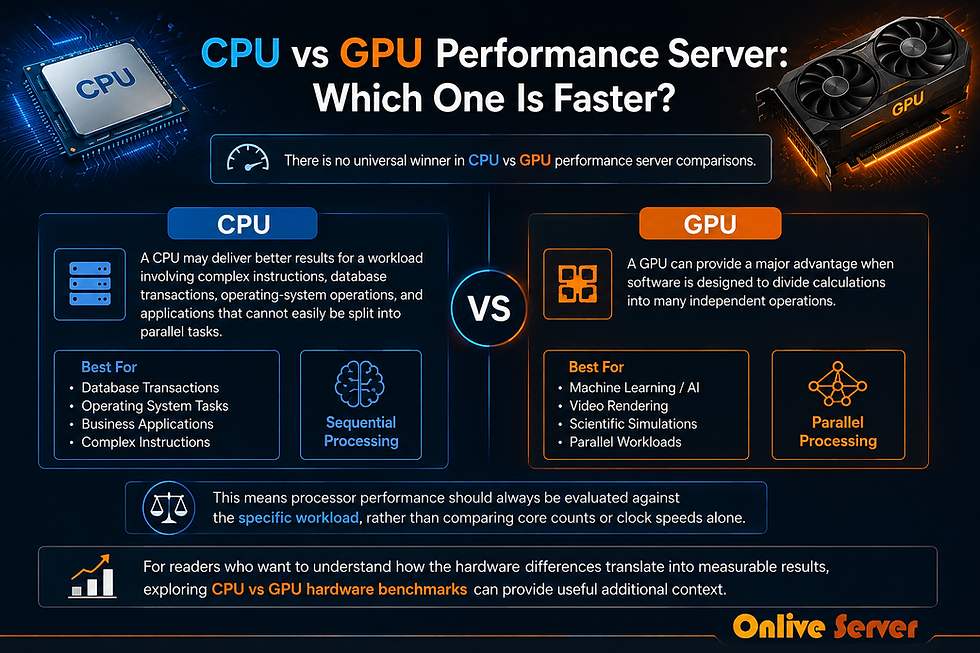
There is no universal winner in CPU vs GPU performance server comparisons.
A CPU may deliver better results for a workload involving complex instructions, database transactions, operating-system operations, and applications that cannot easily be split into parallel tasks.
A GPU can provide a major advantage when software is designed to divide calculations into many independent operations.
This means processor performance should always be evaluated against the specific workload, rather than comparing core counts or clock speeds alone.
For readers who want to understand how the hardware differences translate into measurable results, exploring CPU vs GPU hardware benchmarks can provide useful additional context.
When a CPU Is the Better Choice
A CPU-focused server is usually the more practical option when applications depend heavily on sequential processing or require broad compatibility.
Common examples include:
Heavy Database Processing
Databases often perform operations involving queries, indexes, transactions, permissions, and application logic. While some database workloads can benefit from parallel computing, many everyday database operations rely heavily on CPU resources.
For example, an online business may have thousands of customers searching products while other users place orders. The server needs to process many different requests and handle their individual logic correctly.
A strong CPU, sufficient memory, and fast storage can be more important for this type of workload than adding a powerful GPU.
Web and Application Servers
Most traditional websites and business applications do not require GPU acceleration. Their workloads typically involve handling requests, executing application code, communicating with databases, and managing files.
For these environments, a capable multi-core CPU is often a sensible foundation.
Virtualization
Servers running multiple virtual machines may also benefit from strong CPU resources. Each virtual machine can run different applications, creating a varied workload that requires flexible processing.
Memory capacity and storage performance are also important when planning a virtualization server, so the CPU should not be evaluated in isolation.
If your application needs dedicated resources and a configuration tailored to its workload, custom hardware dedicated servers can be useful to investigate when comparing server infrastructure options.
When a GPU Makes More Sense
A GPU becomes more attractive when an application can take advantage of parallel processing.
Machine Learning
Machine learning often involves large numbers of mathematical operations performed across extensive datasets. Many of these calculations can be parallelized, allowing compatible GPUs to process them efficiently.
For example, training an image-recognition model may involve repeatedly performing calculations across thousands of images. A GPU can handle many of these operations concurrently when the software and framework support GPU acceleration.
Video Processing and Rendering
Video workloads can involve processing large numbers of pixels across many frames. Tasks such as rendering visual effects, transforming images, or encoding compatible workloads can benefit from parallel processing.
A video production company working with high-resolution footage may therefore have very different hardware requirements from a company running a transactional database.
Scientific and Engineering Workloads
Some simulations involve repeating similar mathematical calculations across large datasets. When the software is optimized for GPU computing, parallel processing can significantly change how efficiently these tasks run.
However, software compatibility remains critical. A GPU sitting in a server does not automatically accelerate every application.
CPU vs GPU Server Comparison
Factor | CPU | GPU |
Processing style | General-purpose and sequential | Highly parallel |
Best for | Databases, web apps, business logic | AI, ML, rendering, parallel calculations |
Core design | Fewer, powerful cores | Many smaller processing units |
Task flexibility | Very high | More specialized |
Sequential workloads | Excellent | Usually less suitable |
Parallel workloads | Good | Excellent when supported |
Software dependency | Broad compatibility | Requires suitable GPU-aware software |
The table shows why choosing hardware based only on specifications can be misleading. A server with more processing units is not necessarily faster for every application.
A Practical Example: Database Server
Suppose a company runs an inventory system for warehouses across several locations. Employees constantly search stock levels, update quantities, create orders, and generate reports.
Much of the work involves database queries and application logic. Some operations may need to wait for previous operations to finish, making a strong CPU and fast storage a more natural priority.
Adding a GPU would not necessarily improve the application's performance simply because the GPU has many processing units.
Can a Server Use Both CPU and GPU?
Yes. A server can combine CPUs and GPUs, with each component handling the tasks it is best suited for.
The CPU can manage the operating system, application logic, data movement, and other general tasks, while the GPU handles supported parallel calculations.
This hybrid approach is common for workloads where applications can divide responsibilities between different types of processors. However, it also introduces additional hardware, software, power, cooling, and configuration considerations.
What Should You Consider Before Choosing?
Before selecting a CPU-only or GPU-enabled server, look beyond processor specifications.
Consider these questions:
What applications will run on the server?
Does the software support GPU acceleration?
Is the workload mostly sequential or parallel?
How much RAM does the application require?
How quickly does the server need to access stored data?
Will the workload grow over time?
Does the application have specific CPU or GPU requirements?
It is also useful to monitor your current server before upgrading. CPU utilization, memory usage, storage latency, and application response times can help identify the actual bottleneck.
Common Mistakes to Avoid

Choosing Based Only on Core Count
More cores do not automatically mean better performance. The application must be able to use those cores effectively.
Assuming Every Workload Benefits From a GPU
A GPU can be extremely useful for suitable parallel workloads, but it will not automatically make a database or ordinary website faster.
Ignoring Software Compatibility
Hardware acceleration depends on software support. Always check whether your operating system, application, framework, and drivers can use the selected GPU.
Focusing Only on the Processor
Server performance also depends on RAM, storage, networking, cooling, and software configuration. A powerful processor cannot compensate for every other bottleneck.
Planning Only for Today's Workload
Your requirements may change as traffic, datasets, users, and applications grow. Consider future resource requirements before selecting a fixed configuration.
Frequently Asked Questions
1. Is a CPU better than a GPU for servers?
Neither is universally better. CPUs are more flexible and handle general-purpose workloads well, while GPUs excel at highly parallel calculations.
2. Is a GPU useful for database servers?
It can be useful for specific database workloads that support GPU acceleration. However, many traditional database operations depend more heavily on CPU, memory, and storage performance.
3. Why are GPUs good for machine learning?
Many machine-learning operations involve performing similar mathematical calculations across large datasets. GPUs are designed to execute many such operations in parallel.
4. Can a dedicated server have both a CPU and GPU?
Yes. CPUs and GPUs can work together in the same server. The CPU handles general-purpose tasks while compatible applications can send parallel workloads to the GPU.
5. Does a higher CPU clock speed always mean better server performance?
No. Clock speed is only one part of CPU performance. Architecture, core count, workload characteristics, memory, storage, and software optimization can all affect the final result.
6. Do I need a GPU for video processing?
Not necessarily. Some video workloads can benefit from GPU acceleration, but the actual requirements depend on the software, codecs, resolution, effects, and type of processing involved.
Conclusion
Understanding CPU vs GPU performance server differences makes it easier to match hardware with the work your server actually performs. CPUs remain highly versatile for databases, web applications, virtualization, and complex sequential tasks, while GPUs are particularly valuable for workloads that can take advantage of large-scale parallel processing.
The right decision should start with the application rather than the processor specification. If you are evaluating dedicated infrastructure, exploring custom hardware dedicated servers can be a useful next step for understanding how server configurations can be matched to different workloads.



Comments